Process automation
Taking over the repetition inside the system.
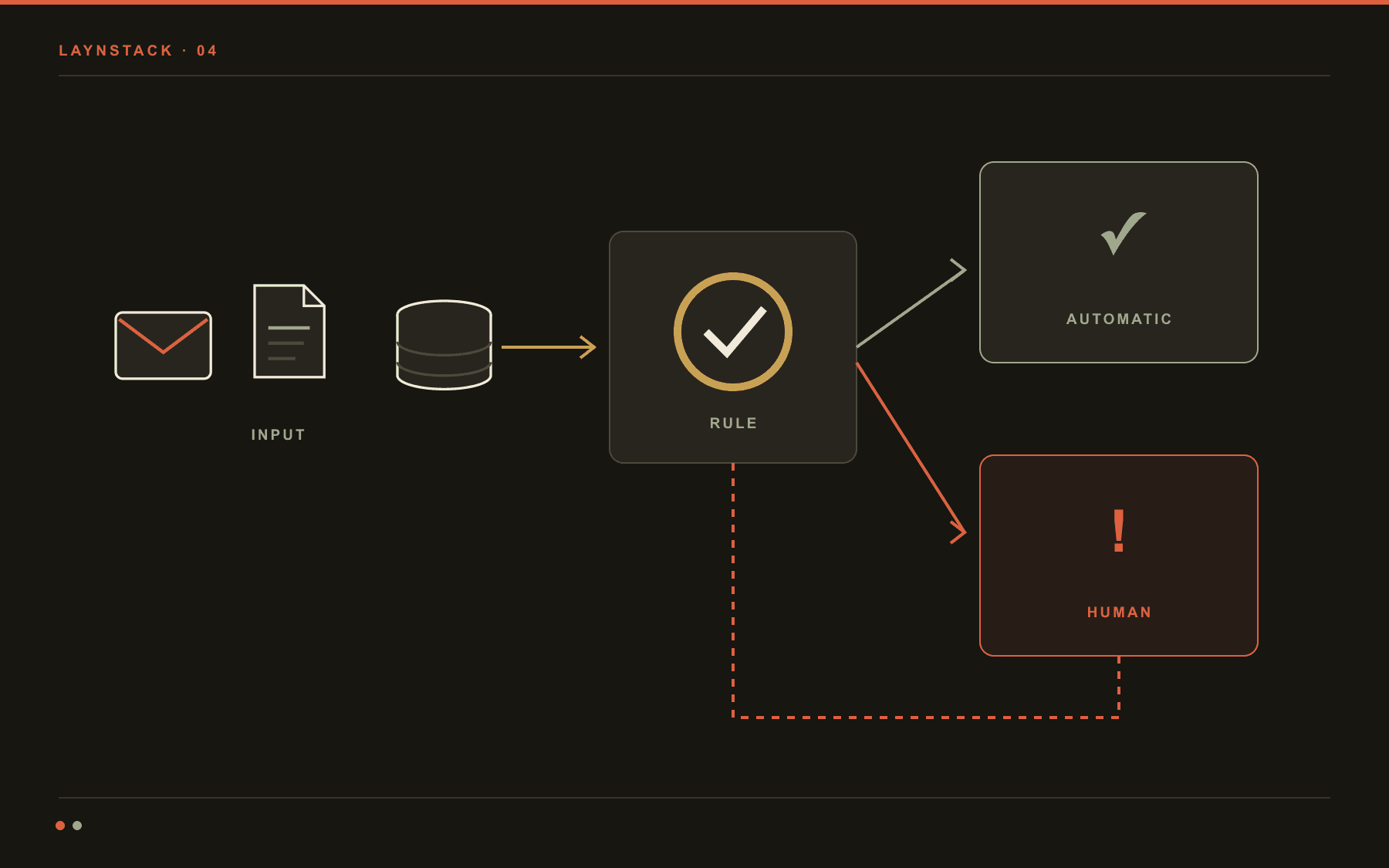
Process automation means handing a repeated manual task over to software, end to end. When a team spends the first hour of every morning in the same place – files pulled out of an inbox, rows typed into a panel, the same rows copied into a second system – there is a flow to take over. We usually built the system in the first place, so the flow does not have to be attached from the outside; it is written inside it.
The hard part of automation is not the happy path, it is the exceptions. Most of the work goes into answering three questions: what if the file is corrupt, what if the other system doesn't answer, what if the same document arrives twice.
- Typical span
- 2–6 weeks
- First flow
- One process, end to end
- Out of scope
- Decisions that need judgement
- Monitoring
- Every run logged
An illustrative month from a live flow
- 40/day
- Documents handledA single flow, triggered at 07:00
- 37
- Finished unattendedThe other three reach the exception queue with a reason
- 11s
- Average run timePer document, download included
- 2h
- Time returnedPer day, across a two-person team
- 0
- Silent failuresA failed run reaches both a screen and an inbox
How a process automation gets built.
Workflow automation means writing out the steps of a process one by one and making them solid enough that nobody has to stand over them. We do not install a general automation platform: we take one process, finish it, and then move to the second.
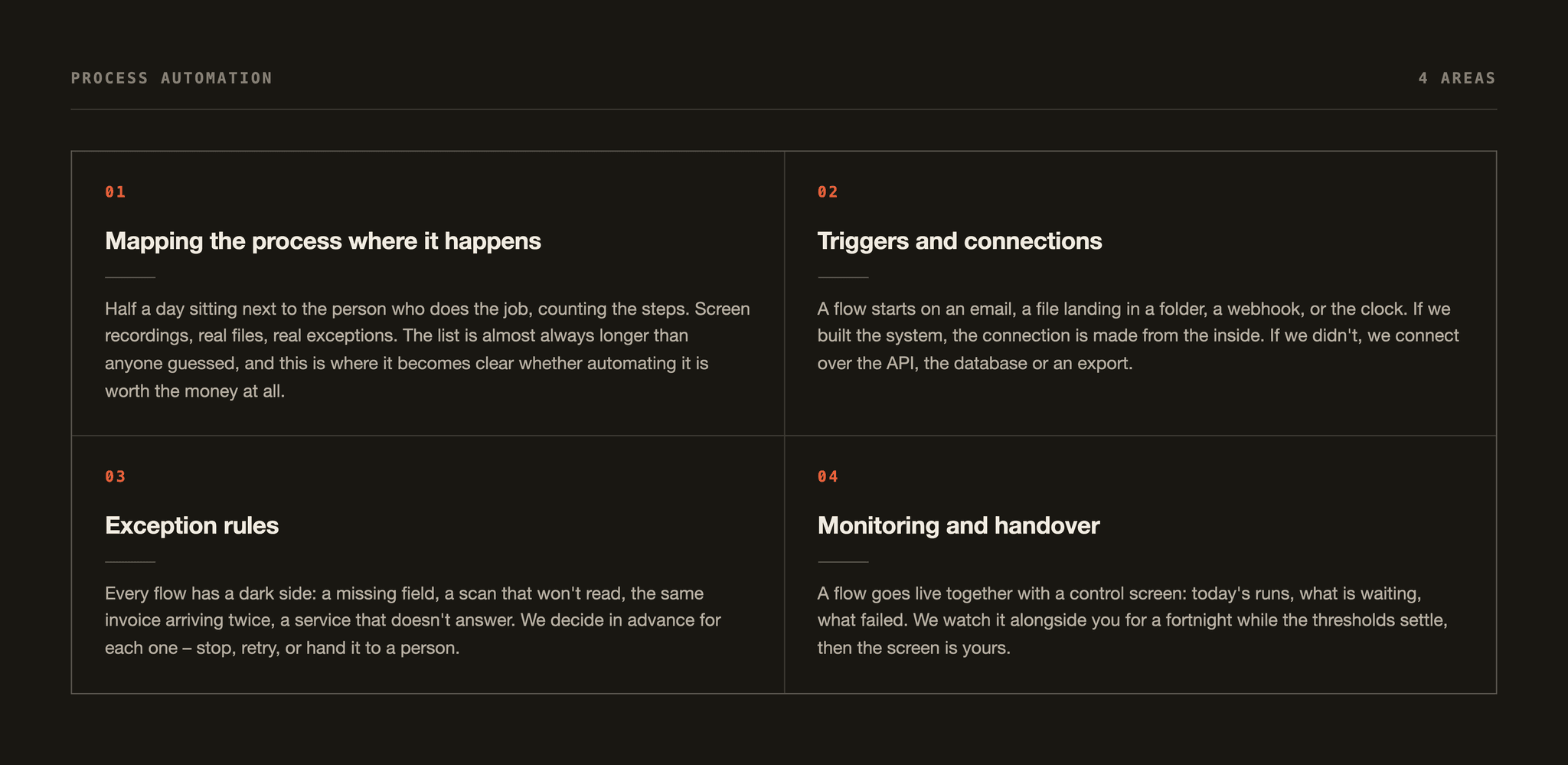
Mapping the process where it happens
Half a day sitting next to the person who does the job, counting the steps. Screen recordings, real files, real exceptions. The list is almost always longer than anyone guessed, and this is where it becomes clear whether automating it is worth the money at all.
- The real flow, step by step
- Minutes spent on each step
- How often exceptions actually occur
Triggers and connections
A flow starts on an email, a file landing in a folder, a webhook, or the clock. If we built the system, the connection is made from the inside. If we didn't, we connect over the API, the database or an export.
- Email, folder, webhook, schedule
- ERP, accounting and CRM connections
- A bridge with written limits where no API exists
Exception rules
Every flow has a dark side: a missing field, a scan that won't read, the same invoice arriving twice, a service that doesn't answer. We decide in advance for each one – stop, retry, or hand it to a person.
- Duplicate detection
- Retries with a widening gap
- One queue for everything a person must see
Monitoring and handover
A flow goes live together with a control screen: today's runs, what is waiting, what failed. We watch it alongside you for a fortnight while the thresholds settle, then the screen is yours.
- Today's runs and their statuses
- Failure alerts by email or Slack
- A button to re-run by hand
One day's ledger.
This is a typical day on a supplier-invoice flow. Forty documents in, thirty-seven out with nobody touching them, three into the queue. The figures are illustrative. The number that matters is not the first one but the third: every queued document carries a written reason.
37 / 40
Documents handled in a day, and the ones nobody touched
- 37
- Finished with nobody touching it11 seconds per document on average
- 2
- Missing field, sent to a personSupplier tax number could not be read
- 1
- Duplicate, stoppedThe same invoice arrived a second time
The record of a single run
- 07:02:14PDF taken from the supplier email
- 07:02:16Fields extracted: total, date, tax number, 14 line items
- 07:02:17Matched to a purchase order (PO-4471)
- 07:02:19Draft entry written into the accounting system
- 07:02:19Filed to the archive, sender acknowledged
All three exceptions sit on one screen with their input file attached. The work that needs a person: about five minutes a day. The queue is a screen inside the panel the flow runs on, not a second tool, and it fits there because we wrote the panel too.
What's in the box.
An automation has to be as legible in month six as on the day it was built. That is why most of what we hand over is writing.
- 01Git repository
The flow itself
One repository, each step in a file you can read on its own. Not locked inside a visual tool, and not tied to a framework of ours.
- 02one-page PDF
The process map
Before and after, side by side, with a written reason for every step that disappeared.
- 03Markdown
The exception book
Every failure state we hit or expect: what the system does about it, and what a person should do.
- 04web panel
The control screen
Runs, statuses, the exception queue and a manual re-run. User accounts for the team included.
- 05email / Slack
Alerting
Who hears about a failure and through which channel, written down. Silence is not one of the options.
- 06included
Two weeks of watching
We watch the runs alongside you for a fortnight after launch; that is when the thresholds and the retry gaps settle.
Four questions.
The ones that reach the table fastest in an automation conversation.
Process automation means handing a repeated manual task over to software, end to end. A concrete example: a supplier invoice arrives by email, the fields are read out of the PDF, a draft entry is written into the accounting system and the document is filed, with nobody opening it.
It is not a robot in someone's chair. The decisions stay with your team; what disappears is the preparation in front of the decision.
No, and that is a good thing. Where a rule can be written we write the rule: cheaper, faster, predictable.
A model only enters where the input is genuinely ambiguous – free text, a scanned document, a request that needs classifying. The proposal lists, line by line, which steps involve a model and what that step costs to run each month.
Usually yes. A report that arrives by email, a file dropped in a folder, an exported CSV, a direct database connection – those are all interfaces. As a last resort we write a bridge that drives the browser, but we only suggest it when nothing else exists, because it breaks the moment the other side changes a screen.
Two things. The first is knowledge: the team that wrote the panel already knows where the data sits, which field depends on what, and which step is still done by hand, so there is no second discovery phase. The second is reach: we can change the system itself.
If a flow needs a new field, an exception screen or a different status, that goes into the system rather than into a workaround built around it. A supplier connecting from the outside only has the openings the system exposes.
Next step
Let's talk about what to build, or what to automate.
A free twenty-minute call. You will be talking directly to the technical team doing the work, not a salesperson. Bring a site, a dashboard, or a task your team repeats every week – if it is not worth building, we say so.
- Free · 20 minutes
- Directly with the technical team
- Reply within 1 working day